Karbon's Sidebar Now Bends to How You Work
You can now hide, pin, and theme Karbon's main menu, so the sidebar shows the places you actually go.
By Max Ducharme
As of Karbon’s October 26, 2026 release.
What changed
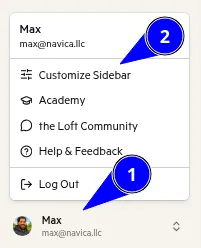
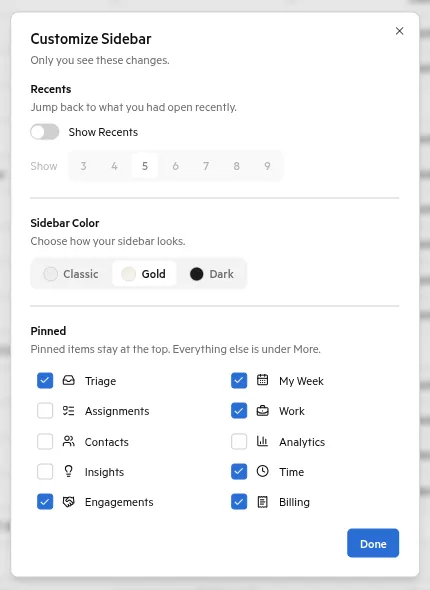
You can now customize Karbon’s main menu. Click your name in the lower left, then Customize sidebar. You can turn menu items on and off, decide how to show recently viewed items, and switch themes: classic, gold, or dark.
Related
Brooks and I talk through this one in the October episode. More from this release: the October release roundup. Source: Karbon release notes, October 26, 2026.
Max Ducharme ran an accounting firm for five years. In that time, revenue more than doubled, and average revenue per employee rose from $89,000 to $150,000. He taught himself Python to build the integrations the firm needed. Today he builds tools that solve the problems accounting firms face now. He is a Six Sigma Black Belt and co-hosts the Working Theory podcast.