NPS Measures Expectations, Not Excellence
A bag of caramel corn moved my clients more than a perfect return. How I built NPS on Karbon and AskNicely, and how to beat expectations on purpose.
By Max Ducharme

Tax season ends on April 15, and one year at the firm I ran in South Jersey, we decided to mark it differently. We ordered caramel corn from Johnson’s Popcorn in Ocean City, New Jersey, and sent it to our top 20 clients by revenue. It was cheap, and it took about an afternoon to organize.
The response caught us off guard. Clients called to thank us, several raved about it, and one mailed us a handwritten thank-you card.
That card stuck with me. We had prepared accurate, on-time returns for those same clients for years, and nobody had ever mailed us a card for a clean return. A bag of caramel corn did what years of good work hadn’t.
It wasn’t a silver bullet. But it taught me what Net Promoter Score actually measures.
The short version:
- NPS measures the gap between what clients expect and what they get. It doesn’t measure how good your work is.
- Survey the decision-maker, after real work, no more than once a quarter. Keep it to one score question and, at most, two short follow-ups.
- Call your detractors, mine your passives for process fixes, and ask your promoters for referrals and testimonials. Never send review requests only to promoters.
- Raise the score by setting expectations, beating them on purpose, and taking credit when you do.
NPS Measures Expectations
David Maister’s First Law of Service says satisfaction equals perception minus expectation.
An accurate return is what clients expect. When a client expects perfection, delivering the work can’t exceed that expectation; it can only meet it. You could deliver it faster, but speed rarely adds value when every similar return shares the same deadline. The popcorn landed because the expectation was zero.
Expectations cut both ways. If a client expects perfect, seamless work and you deliver nearly perfect, nearly seamless work, they may score you low, even when your work is well above the industry average. Your client doesn’t see the industry average. They see the gap between what they expected from you and what they got.
The American Customer Satisfaction Index has a good illustration. In early 2026, NFL fans scored their satisfaction at 66 out of 100, lower than customers of any industry ACSI measures, and ACSI attributed it to emotional investment and high expectations. Loving something and being satisfied with it are different measurements.
You can’t control the score directly. You can control the expectation.
What NPS Gives You
NPS asks one question: how likely are you to recommend us, on a scale of 0 to 10? The answers fall into three bands, and each band tells you how to respond.
- Promoters (9 to 10): These clients love you. Ask them for referrals, testimonials, and case studies.
- Passives (7 to 8): These clients like you, but something fell short. Their answers feed your Pareto chart, and the themes that keep coming up go into your continuous improvement system.
- Detractors (0 to 6): These clients are quietly unhappy. Pick up the phone and get to the bottom of it.
Used well, NPS finds the clients who are struggling, shows you where your service falls short, and feeds your marketing.
How I Built It: Karbon and AskNicely
I built a custom integration between the Karbon API and AskNicely. You can connect survey tools in simpler ways, but a custom integration let me control exactly when surveys went out, who received them, and what happened after a client answered. Here’s how I’d set it up today.
The trigger
Send the survey when specific work items reach a specific status. Do this so the client responds to recent work you did for them, not to a vague annual email out of the blue.
The throttle
No one gets more than one survey per quarter. If a work item completes and the recipient was surveyed in the past quarter, the new survey is blocked, and the next survey goes out on the first trigger after the quarter passes. Do this so your clients don’t get survey fatigue.
The recipient
Survey the right person. If you survey the admin assistant who sends you bookkeeping data, you’re gathering sentiment from someone with no say over the relationship.
At my firm, I surveyed everyone associated with the work item, owner and receptionist alike. That added too much noise. The signal you need is the decision-maker’s score, so focus on getting that one.
I recommend a client custom field for the NPS survey recipient, plus a notification to the team when a survey triggers but no recipient is set.
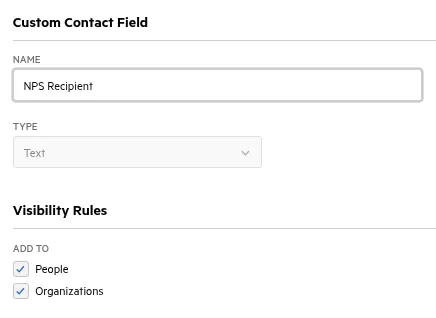
- When the field is empty, assign a Karbon note to the client manager, the client owner, or a default colleague: “We tried to send an NPS survey but couldn’t find a recipient. Please set one on the client.” Include a link to the client’s contact page.
- Replay the survey. Karbon’s API fires a webhook when a custom field changes. When someone fills in the recipient, the integration can resend the blocked survey automatically, as long as the trigger falls within a set window.
- Keep the data clean. Create a contact segment for active clients with no NPS recipient, and another for active clients with no client manager or client owner. Review both once a month, so every detractor alert lands on the right person’s plate.
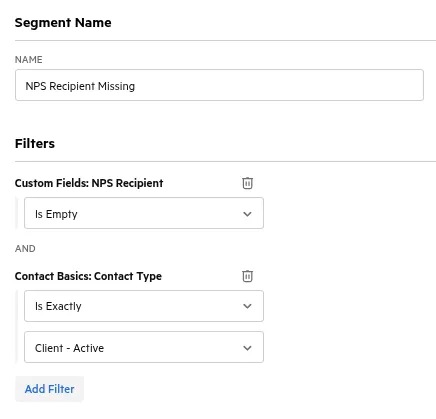
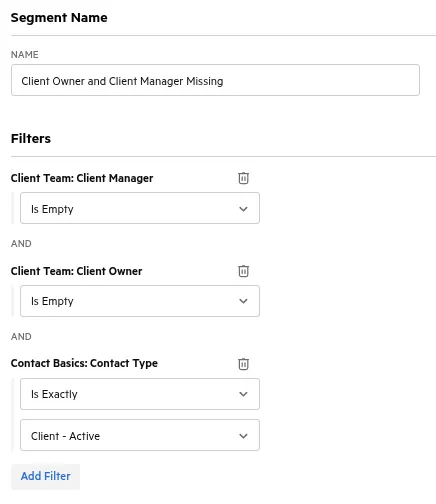
Do this so your score reflects the person who decides whether you keep the work.
Routing by score
The survey changes based on the answer.
- Promoters get a thank-you, and the integration adds them to a drip campaign that asks for a referral or a testimonial.
- Passives get up to two short follow-up questions (more on those below).
- Detractors get an apology on the spot and no more questions. The integration notifies the client manager in Karbon (falling back to the client owner) to call the client within 48 hours.
Do this so each client gets the response that fits their score. Never put an unhappy client through a questionnaire. Call them.
Where the score lives
Manage NPS in AskNicely, but also write each client’s latest score to a number custom field in Karbon. Because you survey only the decision-maker, the score on the client record means something.
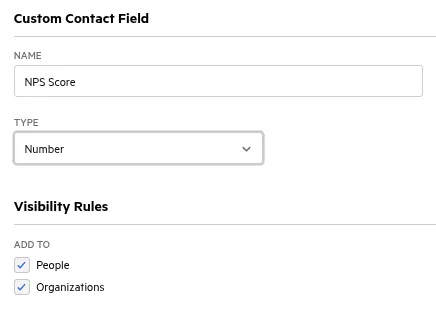
With the score in Karbon, you can build a segment for each band, then add work items in bulk to a whole segment when you run a campaign, such as requesting testimonials or following up with detractors.
A quirk if you build this yourself: Karbon’s number filters in segments are inclusive. “Is More Than” means greater than or equal to, “Is Less Than” means less than or equal to, and “Is Between” includes both ends. So your promoter segment is “Is More Than 9,” passives are “Is Between 7 and 8,” and detractors are “Is Less Than 6.”
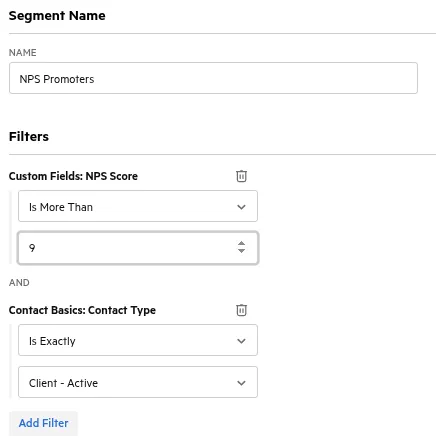
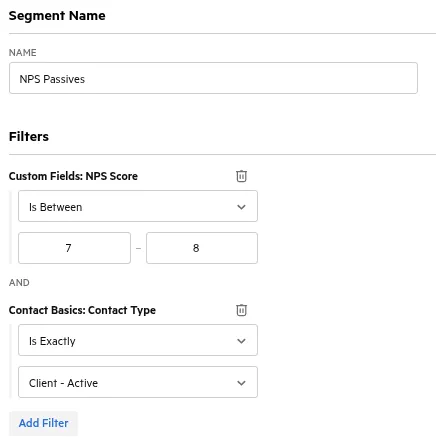
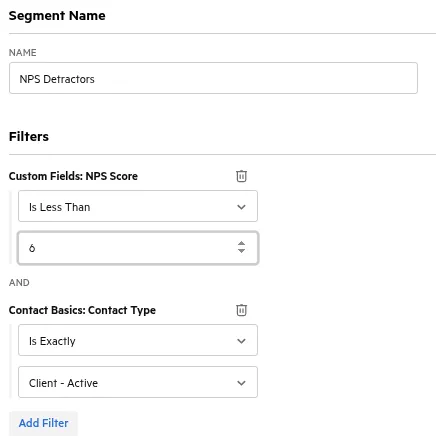
Pass the client owner and client manager to AskNicely with each survey, and do most of your reporting there. AskNicely handles the scoring, the dashboards, and the notifications. Karbon handles the work. Do this so each tool does the job it does best.
Keep the Survey Light
The score is the point. Everything you add to the survey costs you responses.
Survicate analyzed more than 267,000 responses and found that surveys with one to three questions completed at about 83%, while surveys with four to eight questions dropped to about 65%. The first few questions you add are the most expensive ones.
Worse, the people who push through a long survey aren’t typical. They’re the most activated: your happiest and your angriest clients. The quiet middle drops off first, and the quiet middle is where most of your improvement data lives. Extra questions feel useful when you write them, but they make the answers you do get less representative of your client base.
Multi-select or open-ended?
Picking from a list beats writing an answer. Pew Research found that open-ended questions go unanswered far more often than closed ones, and that the more effort a question demands, the more people skip it. Even an optional comment box adds felt effort, especially on a phone.
So use both, in that order. The list catches the problems you already know. The “Other” option and the text box catch the ones you don’t.
How the survey flows
AskNicely records partial responses, which lets you put the most important answer first.
- The email shows the 0 to 10 scale. One click records the score, so even a client who goes no further has given you what matters most.
- The click opens the rest of the survey, which depends on the score:
- Promoters see a thank-you. In the background, they join the testimonial drip campaign.
- Passives get two follow-ups, easiest first. The first is a multi-select: “What could we do to make this a 10?” Show the options in random order, so the first one doesn’t collect extra votes, and include an “Other” option with a write-in. The second is an optional “Tell us more” text box.
- Detractors see an apology. If you’re ready to commit to it, the apology can promise a call.
- Every answer counts. A passive who quits after the multi-select still leaves you their score and their category.
Cap the follow-ups at two. Then, once a quarter, review the “Other” answers (AI can categorize the text boxes for you) and turn the recurring ones into new options on the list.
How often to ask
Industry guidance for business relationships settles on quarterly at most. Survey more often than that, and your clients stop answering. My recommendation sits at the conservative end: surveys fire on completed work, capped at one per quarter.
Turn Every 7 Into a Process Change
Every passive and every detractor is a defect report your firm can use to get better. Treat NPS as part of your continuous improvement system, not a scoreboard.
- Categorize each passive and detractor response.
- Rank the categories in a Pareto chart. Two or three causes usually drive most of the low scores.
- Fix the process, not the person. The answer is usually a template, a checklist, a handoff, or a client communication.
- Close the loop. Tell the clients who raised the issue what you changed in response.
That last step is the one most firms skip. It’s also the one that moves a 7 to a 9.
Traps to Avoid
Don’t ask only your promoters for reviews
You’ll be tempted to send your Google review link only to clients who scored 9 or 10. Don’t.
Google’s review policy prohibits selectively soliciting positive reviews, a practice usually called review gating. Violations can cost you the reviews, or your Business Profile. The FTC’s guide on soliciting reviews warns against it too, and Yelp asks businesses not to solicit reviews at all.
Instead, ask every client for a review on a standard schedule, such as after the annual return is delivered, and keep that request completely separate from NPS. Promoters join drip campaigns for the asks you’re allowed to target: referrals, testimonials, and case studies.
Don’t pay for reviews
No discounts, gifts, or credits in exchange for a review. Keep the popcorn and the review request far apart.
Check with your state board before using testimonials
Some state boards restrict how CPA firms use testimonials. Check your board’s rules before you publish one.
Don’t tie staff compensation to NPS
Too many inputs go into a score, and most of them sit outside any one person’s control. Tie pay to a survey, and people find ways to game it.
I saw this firsthand at AT&T. Our store’s customer survey scores affected our pay. Policy barred us from talking to customers about the survey, but with our livelihood on the line, we found every way around it: “Is there anything else I can do to make this a five-star experience?”
Once people game the score, the data stops telling the truth. Compensation should never depend on NPS.
Don’t survey too often
If clients hear from you every month, they stop answering. The ones who keep answering are the extremes, and your data drifts toward the edge cases.
Set It, Beat It, Name It
If NPS measures expectations, then the lever is expectations. Three steps:
- Set the expectation. Say it explicitly. For example, a three-business-day response time, stated in the engagement letter and repeated at onboarding.
- Beat it systematically. Aim internally for 24 hours.
- Name it. Take credit, and say plainly that it’s beyond the standard: “We promise three days. We got this back to you the same afternoon.”
The third step is the one people skip, because it feels like bragging. It isn’t. If the client doesn’t know you exceeded the expectation, you didn’t change the score; you changed your workload.
When I worked at Cintas, exceeding customers’ expectations was written into the company’s Principal Objective. We did it at Fortune 500 scale by setting clear expectations in each relationship, going beyond them, and taking credit when we did.
An over-delivery nobody notices is unpaid work.
Don’t Create a New Baseline
Over-delivery has a trap. Do it every time, and it becomes the expectation.
I see this with my own car. After some service visits, the Toyota dealer sends a video walkthrough of the inspection. Other times, I get the checklist. The checklist is fine, and I’m glad they did the inspection. A multi-point inspection with every oil change is more than many shops offer. But once I’ve had the video, the checklist feels like a letdown.
An extra delivered inconsistently becomes a broken promise. There are two ways around it.
- Productize it. Turn the extra into a real deliverable, such as a one-page Year in Numbers summary or a video walkthrough of the return. Give it away once as a pilot: “We don’t normally do this. We’re trying something new, so this one’s on us.” Then build it into a higher service tier. The client on your C tier who loved it now has a reason to move to B.
- Make it clearly a one-off. Take credit for it being outside scope, something you’re trying, and not something to expect next year.
Either way, the client knows what they got and why.
Over-Deliver in Service, Never Mess with Pricing
Don’t over-deliver with money. No surprise discounts and no fee breaks. You should be working to raise fees, and a discount teaches the client that your price is negotiable.
Over-delivery belongs in the service, the experience, and the moments the client doesn’t see coming. It should be surprising, useful, and appreciated. Do it intermittently, not with every interaction, and rotate what you do each quarter so no single gesture becomes the baseline.
A few ideas to start with:
- Something outside accounting. A seasonal local gift after business returns. A handwritten note from a partner after a hard engagement, such as an IRS notice or a messy cleanup. An introduction to someone in your network who can help their business.
- An unprompted check-in call. “We’re not set to meet until Q3, but I was thinking about your company and wanted to check in.” Nothing to sell.
- An industry brief. A short white paper on an issue specific to the clients you serve. This works best for niched firms.
- Early delivery, named. Promise the 15th, deliver the 8th, and take credit for it.
Be careful with that last one. You can only promise a date with a buffer if you know your delivery times, which takes takt time, single-piece flow, and capacity planning. Most firms aren’t set up for that yet. Making delivery times predictable is work I do with firms. If you want to get there, book a call with me.
The Popcorn Principle
The popcorn worked because nobody expected it. That’s the whole lever: decide what clients expect, beat it on purpose, and take credit so they notice.
Want This Kind of Control Over Your NPS?
Recipient logic, quarterly throttling, replay on a webhook, and detractor routing to the right person all take a custom integration. Liminos is taking founding customers now, and founding customers shape what we build next. If NPS control like this is on your list, tell us, and we’ll build it with you.
Max Ducharme ran an accounting firm for five years. In that time, revenue more than doubled, and average revenue per employee rose from $89,000 to $150,000. He taught himself Python to build the integrations the firm needed. Today he builds tools that solve the problems accounting firms face now. He is a Six Sigma Black Belt and co-hosts the Working Theory podcast.